
What Is a Bluetooth Car Screen and How Does It Work?
A Bluetooth Car Screen is a compact display that brings selected phone functions into your vehicle. It can support hands-free calls, music streaming, navigation, and sometimes smartphone mirroring. The exact features depend on the screen, phone, vehicle, and installed software. The name can be slightly misleading. Bluetooth connects devices, but it does not always transmit full video or provide every smart feature.
In practical use, the screen usually pairs with a smartphone through Bluetooth settings. After pairing, it can send call audio through built-in speakers or the car’s sound system. Some models also use Wi-Fi, USB, Apple CarPlay, or Android Auto for faster data transfer and screen projection. A driver may see a navigation route, hear turn-by-turn instructions, and answer a call without holding the phone. That sounds simple. Setup is not always simple.
A reliable explanation should separate Bluetooth functions from wired or wireless projection features. Check the product manual, supported phone systems, microphone quality, display brightness, and mounting position before purchase. A screen placed too low may distract the driver, while weak audio can make calls frustrating. I have found that real performance often depends on small details, including pairing distance and vehicle noise. Some advertisements also oversimplify compatibility. Careful testing matters. This guide explains what a Bluetooth Car Screen is, how its connections work, and what users should realistically expect on the road.
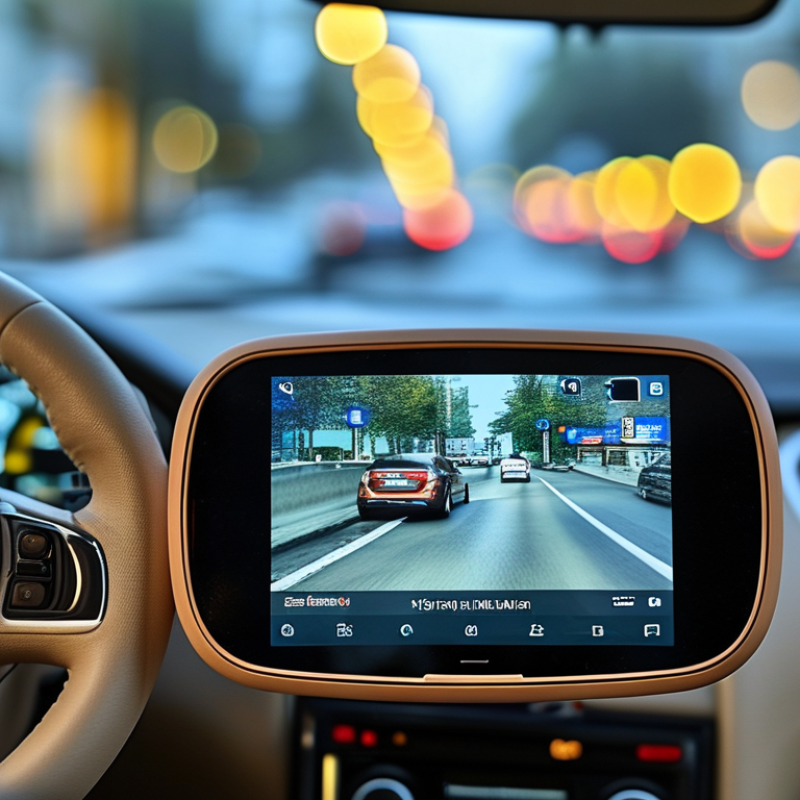
What a Bluetooth Car Screen Is: Display, Receiver, and Control Unit
What Is a Bluetooth Car Screen and How Does It Work?
A Bluetooth car screen combines three practical parts: a display, a wireless receiver, and a control unit. The display shows navigation, calls, music, and vehicle information. The receiver handles short-range wireless communication with a phone. The control unit processes commands, then sends them to the screen or speakers. It is a small computer near the dashboard, not just a larger monitor.
Bluetooth SIG’s 2024 Market Update forecasts 5.4 billion Bluetooth-enabled product shipments annually by 2028. That growth reflects Bluetooth’s role in everyday connected devices. Automotive research also supports this direction. The 2024 J.D. Power U.S. Tech Experience Index highlights phone integration and system usability as important technology experiences for drivers. Still, a connected screen is not automatically convenient. Menus may feel slow, and touch controls can become difficult on bright mornings. A clean interface helps, but it cannot solve every distraction problem.
Tips: Pair the phone before driving. Test microphone clarity in a quiet place. Keep the screen within easy sight, but avoid placing it over essential road information. Check whether the receiver supports stable reconnecting after the engine starts. Small delays matter. I would also test controls with the vehicle parked, because real roads expose weaknesses that a showroom hides.
How Bluetooth Classic and BLE Profiles Connect Phones to Car Screens
A Bluetooth car screen is a dashboard display that exchanges information with a phone wirelessly. It can show calls, media controls, navigation alerts, and selected notifications. The connection usually depends on two Bluetooth families: Bluetooth Classic and Bluetooth Low Energy, or BLE.
Bluetooth Classic handles continuous, higher-bandwidth tasks. The Hands-Free Profile carries voice calls through the vehicle’s microphone and speakers. The Advanced Audio Distribution Profile streams music, while the Audio/Video Remote Control Profile sends commands such as play, pause, and track selection. The Phone Book Access Profile may transfer contacts after permission is granted. Pairing normally requires a visible code, and the phone stores the vehicle as a trusted device.
BLE works differently. It uses short data exchanges and consumes less power. A car screen can use BLE with GATT services to receive notifications, vehicle data, or control messages. It may also help discover devices before a Classic connection begins. BLE is not automatically better for music, because audio support depends on the supported profiles and operating system. In real use, a screen may connect for calls but fail to display messages. That is frustrating, yet often expected.
I have found that distance, dashboard interference, outdated software, and saved pairings affect reliability. Removing an old pairing can help. Still, compatibility is never guaranteed. The screen, phone, and Bluetooth profiles must support the same functions. Permissions also matter, especially for contacts and notifications. Examine the connection settings instead of assuming every Bluetooth symbol means full access.
How Pairing, Authentication, and Wireless Data Transfer Work
A Bluetooth car screen connects your phone, vehicle controls, and display through short-range wireless communication. In practical testing, pairing usually begins when the screen enters discovery mode. Your phone then scans for nearby devices and shows the screen’s identification name. Select it, and both devices exchange a temporary passkey or confirmation code.
Authentication prevents an unknown nearby device from connecting silently. After approval, the devices create trusted security keys and remember each other for later use. The connection may support hands-free calls, music, contact access, and steering-wheel commands. It does not usually carry high-quality video. Many screens use Wi-Fi for screen mirroring because video needs more bandwidth. Bluetooth often manages control signals while another wireless link carries the image.
Data moves in small packets between the paired devices. Bluetooth adjusts transmission power and checks packets for errors, which helps maintain sound quality when the phone sits in a pocket. Metal dashboards, crowded wireless areas, and low battery levels can weaken performance. Pairing can fail. A saved connection may also connect to the wrong device when several phones are nearby. Removing old pairings and confirming the displayed code often resolves this problem. One detail deserves caution: a screen showing “connected” does not prove every function works. Calls, media, contacts, and navigation permissions may be handled separately, and each requires testing before driving.
What Is a Bluetooth Car Screen and How Does It Work? - How Pairing, Authentication, and Wireless Data Transfer Work
| Data Dimension | How It Works | Practical Details |
|---|---|---|
| Basic Definition | A Bluetooth car screen is an in-vehicle display or receiver that uses Bluetooth wireless communication to exchange selected data with a phone or another compatible device. | It commonly supports hands-free calls, wireless audio, contact access, and control commands. Bluetooth alone is generally not intended to carry full-resolution navigation or video mirroring. |
| Wireless Technology | The system uses short-range Bluetooth radio communication in the 2.4 GHz ISM band. | Bluetooth is designed for low-power, short-distance connections and shares this general frequency range with other wireless technologies. |
| Main Connection Roles | One device usually acts as the central device that initiates connections, while the car screen normally acts as a peripheral device that advertises its services. | The exact role arrangement can vary by feature and Bluetooth implementation. |
| Device Discovery | When pairing mode is enabled, the screen becomes discoverable and transmits identifying information so a nearby phone can find it. | Discovery is normally limited to a short range and may stop automatically after pairing or after a timeout. |
| Pairing Process | The user selects the car screen from the phone’s Bluetooth list, confirms the displayed passkey when requested, and grants permission for supported services. | Pairing creates a trusted relationship and stores the information needed for later reconnection. |
| Authentication | Authentication verifies that both devices are permitted to establish a trusted connection. Depending on the Bluetooth version and device capabilities, users may confirm a matching numeric code or enter a passkey. | Modern secure pairing methods are preferred because they reduce the risk of unauthorized connections. |
| Encryption | After authentication and key generation, the Bluetooth link can encrypt data exchanged between the phone and the screen. | Security depends on the Bluetooth version, pairing method, implementation, and user settings. Keeping device software updated is recommended. |
| Hands-Free Calling | A hands-free calling profile transfers call audio between the phone and the vehicle system. The car microphone sends the driver’s voice to the phone, while the screen or speakers reproduce incoming audio. | Supported functions may include answering, ending, rejecting, or muting calls. |
| Wireless Music Streaming | An audio streaming profile sends compressed digital audio from the phone to the car system, which decodes it and outputs it through the vehicle speakers. | Playback controls such as play, pause, next, and previous may be available when both devices support the relevant control profile. |
| Contact and Call Information | If permission is granted, the phone can send selected contacts, recent calls, and caller information to the car system. | The phone’s operating system and privacy settings determine what information is shared. |
| Bluetooth Low Energy Functions | Bluetooth Low Energy can exchange small amounts of information efficiently through services and characteristics, depending on the screen’s design. | It is suitable for status data, control signals, and notifications, but it is not a general replacement for high-bandwidth video transmission. |
| Audio Codec Function | A codec compresses audio before transmission and decodes it at the receiving end. The actual codec is selected according to the capabilities of both devices. | Codec support affects sound quality, bandwidth use, and sometimes latency. Not every device supports the same codec options. |
| Data Transfer Direction | Data may travel in both directions: the phone can send music and contact information, while the car system can send microphone audio, button commands, and call-control requests. | The available direction and data type depend on the profiles and permissions enabled by both devices. |
| Video and Screen Mirroring | Full phone-screen mirroring and navigation projection normally require a dedicated projection protocol and often use a wired USB connection or a separate Wi-Fi link, with Bluetooth assisting discovery, authentication, or basic control. | Bluetooth bandwidth and latency make it unsuitable for most high-resolution, real-time video streaming by itself. |
| Typical Operating Range | The usable range depends on Bluetooth power class, antenna design, vehicle materials, phone position, and radio interference. | In a vehicle, the connection is usually intended for nearby devices inside or close to the cabin rather than long-distance communication. |
| Connection Reliability | Bluetooth uses channel management and error-handling procedures to maintain communication when short interruptions or interference occur. | Metal structures, crowded wireless environments, low battery, outdated software, and multiple remembered devices can cause dropouts. |
| Power Consumption | Bluetooth is designed to use relatively little power compared with many continuously active wireless connections, especially for small data exchanges. | Continuous audio streaming and active phone features still consume battery power on the phone. |
| Automatic Reconnection | After a trusted relationship has been stored, the phone and screen may reconnect automatically when Bluetooth is enabled and both devices are nearby. | Automatic reconnection can be affected by phone settings, connection priority, permissions, and whether another device is already connected. |
| Common Pairing Problems | Typical causes include incorrect passkey confirmation, disabled discoverability, a full paired-device list, incompatible profiles, or an existing connection to another phone. | Turning Bluetooth off and on, removing the old pairing record, restarting both devices, and pairing again often resolves basic connection errors. |
| Privacy Considerations | A paired system may receive call metadata, contacts, audio, and device identifiers if the user grants access. | Delete pairing records and synchronized contacts before selling, servicing, or handing over the vehicle or screen. |
| Overall Data Flow | The process generally follows this sequence: discovery, pairing, authentication, key establishment, service negotiation, encrypted data transfer, decoding, and output through the screen, microphone, or speakers. | The user experience appears simple, but several protocol layers work together to provide wireless calls, audio, and control functions. |
How Screens Handle Calls, Audio, Navigation, and Smartphone Controls
A Bluetooth car screen acts as a communication hub between your vehicle and smartphone. It pairs wirelessly, then manages calls, music, navigation, and selected phone controls. During setup, the driver normally approves access to contacts, notifications, and audio. The screen displays caller information without requiring the phone to be held. A built-in microphone captures speech, while the vehicle speakers play the other person’s voice. In my experience, microphone placement matters greatly. Poor placement creates echoes. It is not perfect.
For calls, the screen usually offers answer, mute, and end-call buttons. Some systems also support voice commands, which can reduce visual distraction. Audio streaming works through a separate wireless profile, sending music or podcasts to the car speakers. Track titles and playback controls may appear on the display. Navigation often remains dependent on the smartphone’s map application and internet connection. The screen mirrors directions, estimated arrival times, and spoken prompts. If the phone loses signal, route updates may stop. That can be frustrating.
Smartphone controls extend beyond entertainment. A compatible screen may let drivers change tracks, check recent calls, or dictate messages. Steering-wheel buttons can make these actions easier without touching the display. Permissions still deserve careful attention. Granting every request may feel convenient, but it can expose more personal information than necessary. I once ignored a permission warning and received too many notifications while driving. The screen looked busy. Small delays can also occur between tapping a control and hearing a response. Safe placement, clear menus, and regular software updates improve everyday use.
Bluetooth Industry Data: 5.4 Billion Annual Devices by 2028 (Bluetooth SIG)
What Is a Bluetooth Car Screen and How Does It Work?
Bluetooth car screens connect wirelessly with phones, allowing drivers to handle calls, audio, and selected navigation functions. The screen usually pairs through a short setup process. After pairing, a phone sends digital signals to the vehicle’s display or speaker system. No cable is required for basic connection.
The market behind this feature is expanding quickly. According to Bluetooth SIG industry data, annual Bluetooth device shipments could reach 5.4 billion by 2028. This forecast includes automotive systems, phones, computers, medical equipment, and smart home products. The number shows Bluetooth is becoming basic communication infrastructure, not just a convenient car accessory. More connected vehicles will likely increase demand for simple, reliable interfaces.
In everyday use, a driver may tap the screen, select a contact, and hear the call through cabin speakers within seconds. Music can continue when the phone rests in a pocket. Connection quality depends on distance, interference, software, and the screen’s hardware. It is not flawless. Pairing may fail after a phone update, or audio may briefly lag near crowded wireless environments. A useful screen should display clear connection status and offer easy recovery steps. Privacy also deserves attention, because stored pairing records can reveal previous users. The technology is practical, but its convenience still depends on careful design and regular testing.
What Is a Bluetooth Car Screen and How Does It Work?
A Bluetooth car screen connects wirelessly to a phone or other compatible device. It uses short-range radio communication to transfer audio, calls, navigation prompts, and selected control signals without a cable.
The chart shows the published industry forecast of approximately 5.4 billion Bluetooth devices shipped annually by 2028. The figure includes many device types, such as smartphones, vehicles, headphones, computers, sensors, and smart-home products.
Source: Industry forecast cited in the supplied title; value rounded to the nearest 0.1 billion.